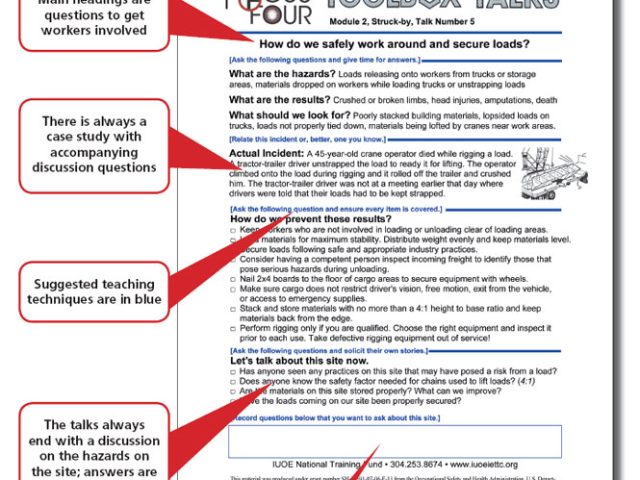
Workers arrive on site with different levels of experience, awareness, and focus. One near-miss can unravel weeks of safe operations. That’s where tool box talks come in—short, focused safety discussions that reinforce protocols, address risks, and keep teams aligned. But creating them from scratch every week? That’s inefficient. That’s why professionals are searching for effective tool box talks download options: pre-built, customizable templates that save time without sacrificing quality.
The real value isn’t just in having a document—it’s in delivering consistent, relevant, and engaging safety communication. A poorly structured talk gets ignored. A well-designed one changes behavior.
Here’s how to find, select, and use downloadable tool box talks to strengthen your safety culture.
Why Downloadable Tool Box Talks Are a Game-Changer
Creating safety talks every week is time-consuming. Most supervisors aren’t safety trainers. They need simple, credible, and easy-to-deliver content. Downloadable tool box talks solve that problem.
They offer: - Consistency – Standardized topics ensure no critical area is overlooked. - Time savings – No need to research regulations or draft outlines from zero. - Regulatory alignment – Many templates follow OSHA, NIOSH, or ANSI standards. - Adaptability – Edit templates to match your site, equipment, or recent incidents.
But not all downloads are equal. Generic talk sheets with vague warnings like “be careful” fail to engage. The best ones include discussion prompts, real-world hazards, and actionable takeaways.
For example, a talk on ladder safety shouldn’t just say “inspect ladders”—it should ask: “What damage would make a ladder unsafe to use?” and list specific red flags: cracked side rails, missing rivets, worn feet.
That kind of detail turns passive listening into active participation.
Key Features of High-Quality Downloadable Tool Box Talks
When evaluating a tool box talks download package, look beyond the number of templates. Focus on structure, relevance, and usability.
#### 1. Clear Topic Focus Each talk should cover one specific hazard or procedure—noise exposure, fall protection, lockout/tagout—not bundle multiple themes. Narrow scope increases retention.
#### 2. Discussion Questions The best templates include open-ended questions to prompt dialogue. These prevent the talk from becoming a monologue and help identify knowledge gaps.
#### 3. Visual Aids or Diagrams Some high-end downloads include simple sketches or photos (e.g., proper lifting posture, PPE requirements). These improve understanding, especially in multilingual crews.
#### 4. Sign-In Sheet Integration Compliance often requires attendance records. Quality packages bundle customizable sign-in sheets that match the talk format and include space for feedback.
#### 5. Editable Formats Downloads in Word or PDF (with form fields) let you tailor content. Avoid rigid formats that can’t be updated for site-specific risks.
#### 6. Industry-Specific Relevance Construction, manufacturing, warehousing, and utilities face different hazards. Choose downloads tailored to your sector. A mining safety talk won’t help a roofing crew.
Top 5 Sources for Reliable Tool Box Talks Downloads
Not all free templates are created equal. Some are outdated, overly generic, or lack legal defensibility. Below are five trusted sources offering high-value, customizable tool box talks downloads.
| Source | Format | Topics Included | Customization | Best For |
|---|---|---|---|---|
| OSHA.gov | PDF, plain text | 30+ core topics (falls, PPE, electrical) | Limited | Regulatory alignment, baseline compliance |
| National Safety Council (NSC) | PDF, PowerPoint | 50+ with data-backed content | Moderate (editable fields) | Data-rich teams, mid-to-large organizations |
| SafetyNow | Word + PDF | 100+ including niche hazards | Full editability | Supervisors needing weekly variety |
| Creative Safety Supply | PDF, editable templates | 40+ with visual aids | High | Visual learners, multilingual crews |
| HSE UK (free downloads) | 25+ with risk assessment links | Low | International standards, ISO-aligned sites |
Pro Tip: Pair NSC templates with OSHA checklists. Use the NSC content for discussion and OSHA guides to verify regulatory completeness.
Avoid random blog-post downloads. Many lack review dates, author credentials, or references to current codes. Stick to established safety organizations or reputable EHS providers.
How to Customize Downloaded Talks for Maximum Impact
Downloading a template is the first step. Making it relevant is what drives results.
Follow this workflow:
- Review Site-Specific Risks
- Before modifying, walk the site. Identify recent incidents, new equipment, or changing conditions. If workers are installing skylights, update your fall protection talk to include roof anchors and edge awareness.
- Localize Language and Examples
- Replace generic references with real equipment names (“use the Genie lift model GS-4690”) or site rules (“wear high-vis green, not yellow, per site uniform policy”).
- Add Incident Snapshots (When Appropriate)
- If there was a close call last month—e.g., a forklift nearly hit a pedestrian—add it as a case study. “This happened here. How could we prevent it next time?”
- Shorten for Attention Span
- Most talks should last 5–10 minutes. Cut long paragraphs. Use bullet points. Convert complex jargon into plain speech.
Instead of: "Ensure proper derating of personal fall arrest systems when used in leading-edge applications." Use: "If you’re working near an open edge, your harness and lanyard must be rated for that—ask your supervisor before starting."
- Assign Follow-Up Actions
- End with one task: “Inspect your gloves today,” or “Report damaged extension cords to the foreman.” This turns awareness into action.
Common Mistakes That Undermine Tool Box Talks
Even with great downloads, poor delivery kills effectiveness.
Mistake 1: Reading Word-for-Word Supervisors who recite the script lose engagement. Use the template as a guide, not a script. Speak naturally. Make eye contact.
Mistake 2: Skipping Attendance Records No sign-in sheet? No proof it happened. Auditors and insurers require documentation. Always collect names, dates, and topics.
Mistake 3: Repeating the Same Topics Without Updates Talking about fire safety every January isn’t enough. If you’ve had winter slip incidents, update the content to include ice removal and footwear checks.
Mistake 4: Choosing Topics Too Broad “General safety” is useless. Pick specific, timely hazards: “Using heated vests in cold weather,” or “Avoiding pinch points on conveyor belts.”
Mistake 5: No Follow-Up If nothing changes after a talk, workers assume it’s just box-ticking. Walk the site afterward. Verify that crews are applying what was discussed.
Integrating Downloads into Your Safety Workflow
Tool box talks should be part of a larger safety rhythm, not isolated events.
Here’s how to embed downloaded talks into operations:
- Schedule in Advance
- Plan topics quarterly. Rotate through core hazards (falls, electrical, struck-by) and insert reactive talks after incidents.
- Assign Talk Leaders
- Don’t let the same person lead every time. Rotate supervisors or experienced workers. It builds ownership and improves delivery quality.
- Link to Training Records
- Store completed talks and sign-in sheets in a central folder—digital or physical. Tag them by date, topic, and crew for easy retrieval.
- Audit for Compliance
- Monthly, review talk logs. Are all crews receiving equal attention? Are high-risk areas covered more frequently?
- Solicit Feedback
- Ask workers: “What topic should we cover next?” Their input increases buy-in and surfaces hidden risks.
Where Free Downloads Fall Short (And How to Fill the Gaps)
Free tool box talks downloads are valuable, but they have limits.
They often lack: - Site-specific illustrations – No photos of your facility or equipment. - Multilingual support – Critical for diverse crews. - Integration with digital platforms – Such as safety apps or CMMS systems. - Version control – Old templates may circulate if updates aren’t tracked.
To fill these gaps: - Translate key talks using professional services or bilingual team leads. - Take photos of correct vs. incorrect practices on your site and insert them into templates. - Upload talks to platforms like iAuditor or SafetyCulture for tracking and delivery.
Some companies invest in custom tool box talk libraries built from free downloads, then refined over time. This hybrid approach delivers both efficiency and relevance.
Make Safety Stick: From Download to Action
A tool box talks download is only as good as its execution. The best templates won’t matter if talks are rushed, ignored, or disconnected from daily work.
Choose downloads from trusted sources. Customize them ruthlessly. Deliver with confidence. Follow up with observation and accountability.
When done right, these brief conversations don’t just check compliance boxes—they prevent injuries, build trust, and shape a culture where safety is spoken, not just posted.
Start with a reliable download. End with a safer worksite.
FAQ
Where can I get free tool box talks downloads? Reputable sources include OSHA.gov, the National Safety Council, Creative Safety Supply, and HSE UK—all offer free, downloadable safety talk templates.
Are downloaded tool box talks OSHA-compliant? Many are based on OSHA standards, but you must verify and customize them for your site. OSHA doesn’t approve specific templates.
How often should tool box talks be held? Weekly is ideal, especially in high-risk environments. At minimum, conduct them monthly or after incidents, new equipment, or process changes.
Can I edit downloaded tool box talks? Yes—use Word or editable PDF versions to add site-specific details, update language, or insert company policies.
Should tool box talks be signed off? Yes. Always use a sign-in sheet to record attendance. This serves as documentation during audits or investigations.
What topics should I cover in tool box talks? Focus on common hazards: falls, PPE, electrical safety, struck-by incidents, ergonomics, and equipment operation. Rotate topics and react to near-misses.
How long should a tool box talk last? Keep it between 5 and 10 minutes. Be concise, interactive, and focused on one clear safety message.
FAQ
What should you look for in Tool Box Talks Download: Free Templates & Best Practices? Focus on relevance, practical value, and how well the solution matches real user intent.
Is Tool Box Talks Download: Free Templates & Best Practices suitable for beginners? That depends on the workflow, but a clear step-by-step approach usually makes it easier to start.
How do you compare options around Tool Box Talks Download: Free Templates & Best Practices? Compare features, trust signals, limitations, pricing, and ease of implementation.
What mistakes should you avoid? Avoid generic choices, weak validation, and decisions based only on marketing claims.
What is the next best step? Shortlist the most relevant options, validate them quickly, and refine from real-world results.


:max_bytes(150000):strip_icc():focal(749x0:751x2)/michael-jackson-Jafar-Jackson-tout-021424-09f2c7134c534740807a7033577a917a.jpg)